
Azure Arc enabled data services let you run Azure's managed database services outside Azure. The database sits on a Kubernetes cluster on your own hardware, in your own data centre or in another cloud, while the management happens through Azure. The data stays where it is, the control panel moves to the cloud.
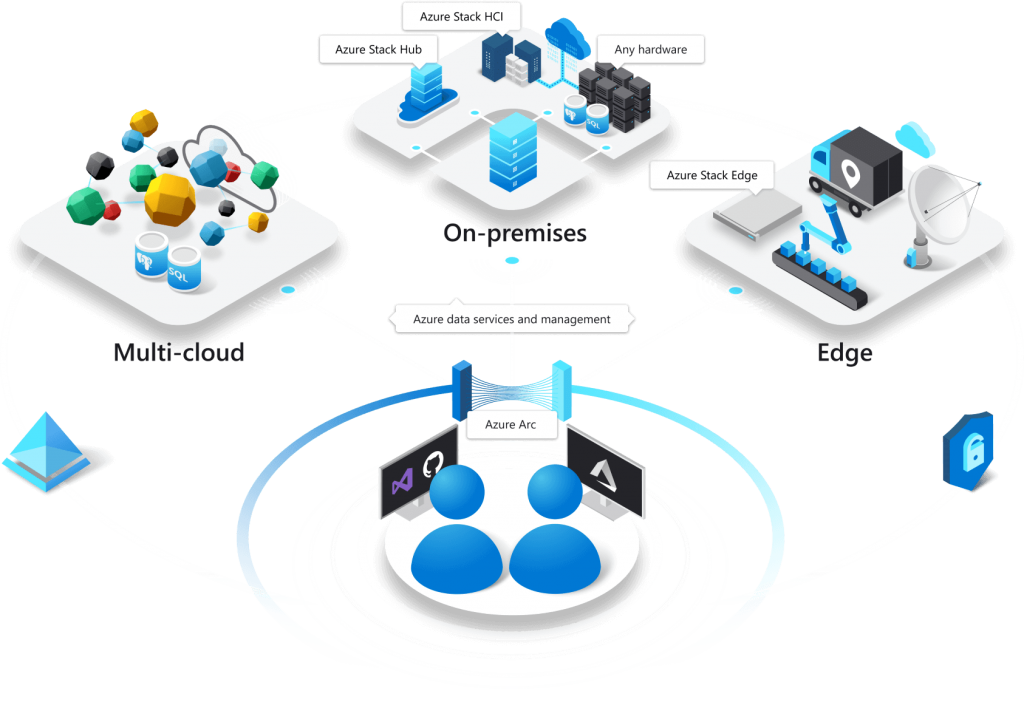
Why would you care?
For some data, staying put is not a preference but a requirement. Regulation demands it, the latency budget will not stretch, or the application holding that data cannot move anywhere. The same team still envies the automation on the cloud side: patching, scaling, backups, a single inventory screen.
-
The data stays put
The database runs on your cluster. For workloads that cannot leave, because a regulator says so or because the latency budget will not stretch across a WAN link, this is usually the only path that works at all.
-
Management from one place
On-premises instances show up in the Azure portal. Inventory, monitoring and policy run from the same screen as your cloud resources.
-
No permanent internet requirement
There are two modes. In the indirect one the cluster does not have to see Azure continuously, usage data is uploaded periodically.
-
Runs on Kubernetes
The service needs a Kubernetes cluster. It can sit in your data centre, on AKS or in another cloud. The series used Azure Kubernetes Service.
The article series
I wrote five articles between February and April 2021. The order is the installation order: Arc support on the SQL Server side, then the Kubernetes configuration, then the SQL Managed Instance setup, its configuration, and finally moving an existing database onto it.
The articles themselves are in Turkish.
-
Azure Arc, SQL Server (Preview)
26 February 2021
Registering existing SQL Server instances with Azure. The opening article.
-
Configuring on Azure Kubernetes
4 April 2021
Preparing the cluster that will host the data controller. Everything after this depends on getting these steps right.
-
SQL Managed Instance setup
10 April 2021
Bringing the managed instance up.
-
SQL Managed Instance configuration
16 April 2021
Settings, connectivity and resource limits.
-
Migrating to SQL Managed Instance
22 April 2021
Moving an existing database onto that instance. The part of the series that drew the most questions.
Sessions I presented
I also presented the series live, twice, in May and June 2021. Announcements and notes are here:
- First session 29 May 2021
- Second session 4 June 2021
Frequently asked questions
What are Azure Arc enabled data services?
They are a way to run Azure's managed database services outside Azure. The database sits on your Kubernetes cluster and is managed from the Azure portal, so the data stays inside your organisation while management uses cloud side tooling.
How is this different from Azure SQL Managed Instance?
Azure SQL Managed Instance runs in Azure data centres. The Arc enabled version is the same service on your own infrastructure. Management feels the same. What differs is where the database physically sits, and that difference is the entire reason the Arc version exists.
Is Kubernetes required?
Yes, the data services run on a Kubernetes cluster. That cluster can be in your own data centre, on Azure Kubernetes Service or in another cloud.
Does it need a permanent internet connection?
No. In indirectly connected mode the cluster does not have to talk to Azure continuously, usage and inventory data is uploaded periodically. In directly connected mode management operations run immediately.
Can I still follow this series today?
For the architecture and the order of installation, yes. Compare the commands and screens against Microsoft's current documentation first. The series was written against the spring 2021 release.
Building a hybrid data environment? Managing on-premises databases together with Azure, moving the rest to the cloud, or deciding between the two. Let us talk about where to start.
Consulting